
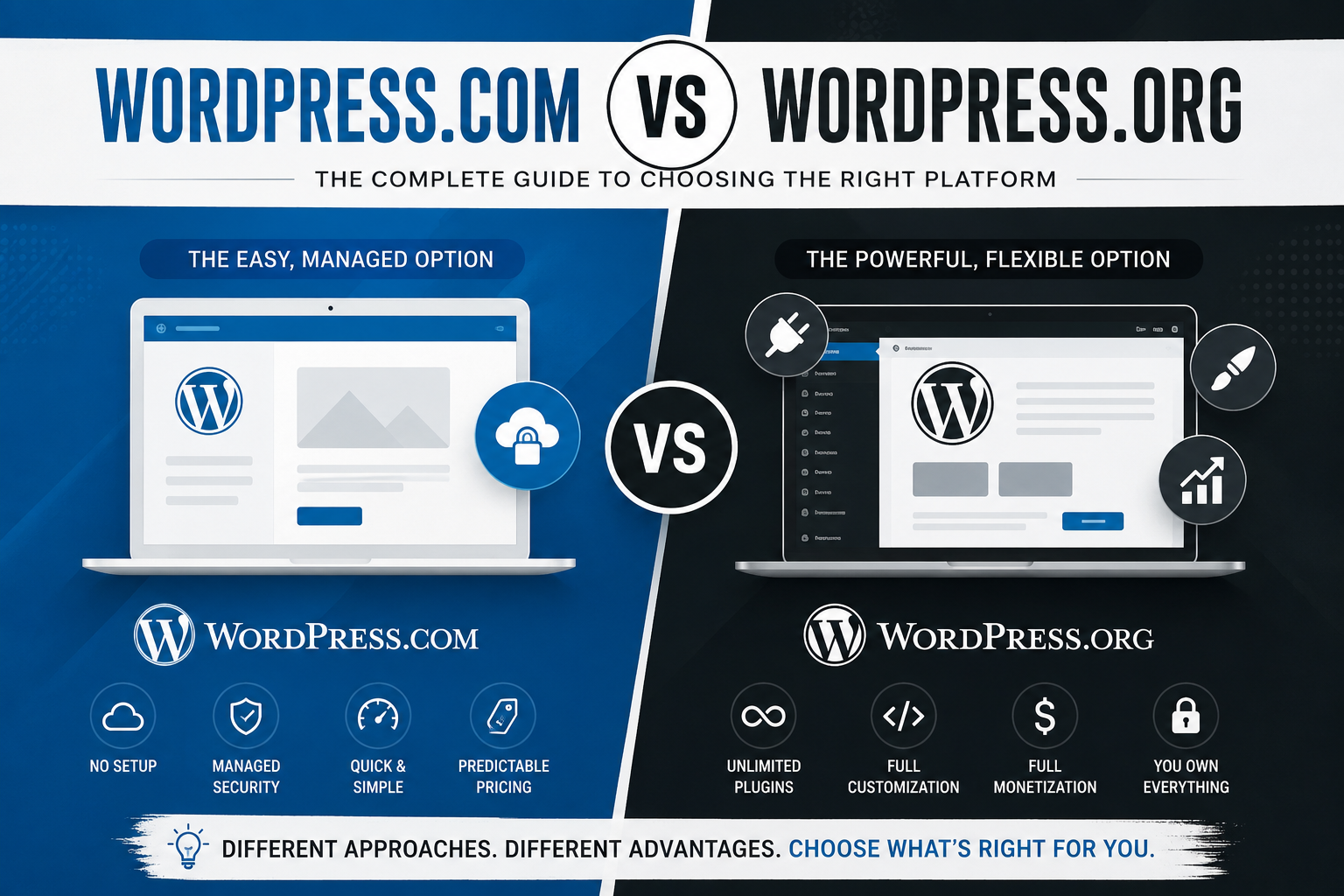
WordPress.com vs WordPress.org: What’s the Difference
WordPress.com vs WordPress.org: What’s the Difference
Nearly every week, I see a new site owner sign up for a WordPress account, waste hours agonizing over a theme selection, get to installing a plugin, and then hit a wall because there are no plugins! That’s the first time that many users understand wordpress.com versus wordpress.org isn’t a trick question, but instead two wildly different products with similar names.
About 43% of all the sites on the web are built with WordPress, but that number actually obscures two very different things with their own cost structures, fee models, and limitations. Choosing the wrong version either overpays for features you don’t use or forces you into painful site migrations later down the line.
So, we’re setting the record straight on the WordPress difference.
The Root of the Confusion: One Name, Two Platforms
Both platforms trace back to the same open-source project, founded by Matt Mullenweg in 2003. But today they’re run differently:
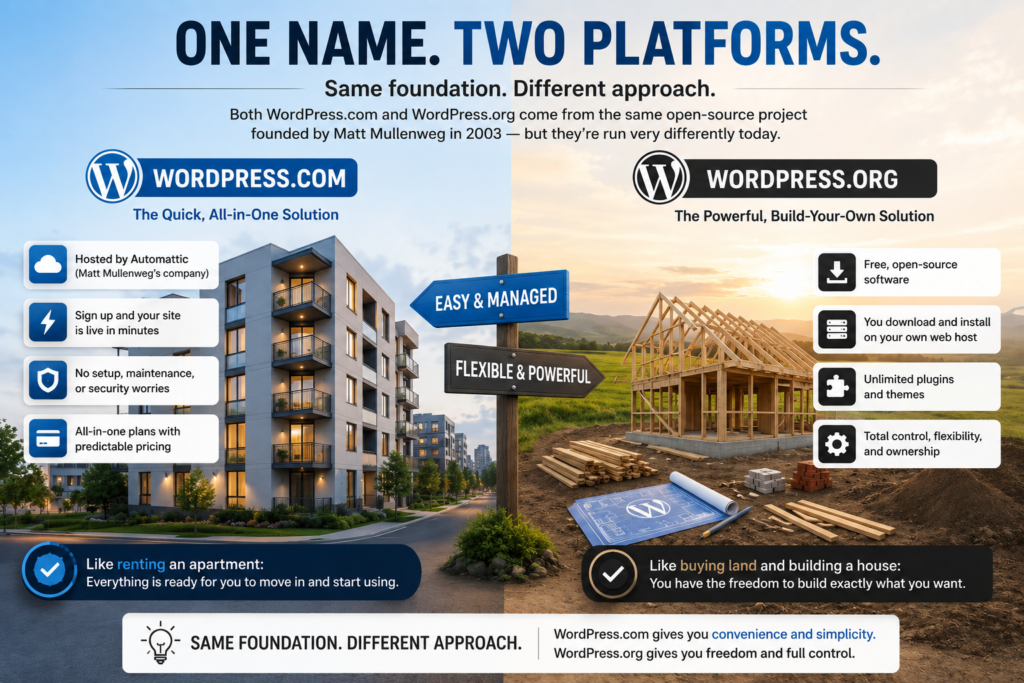
- WordPress.org It is a completely free, open source, software that you download and install onto a web host that you purchase separately (Bluehost, SiteGround, WP Engine etc). This is often called “self hosted WordPress”.
- WordPress.com This is the hosting service that comes from Mullenweg’s company, Automattic. It is essentially the exact same software as the first option, but is presented as a package so that your website can be built very quickly by just signing up.
- In other words, using WordPress.org to build a website is akin to renting an apartment fully fitted and ready for immediate move-in, whereas using WordPress.com is akin to purchasing a plot of land on which to build your own property using a free set of plans. Same place, entirely different approach.
- WordPress.com is a commercial hosting service built by Automattic, Mullenweg’s company. It runs the same underlying software but packages it as an all-in-one product — sign up, and your site is live in minutes.
It’s almost like comparing the difference between renting an apartment that is already complete with all the amenities and furniture you can ever ask for (WordPress.com) and purchasing a land where you will build a house yourself by using open source blueprints. Both have their own advantages and disadvantages when it comes to ownership and responsibility.
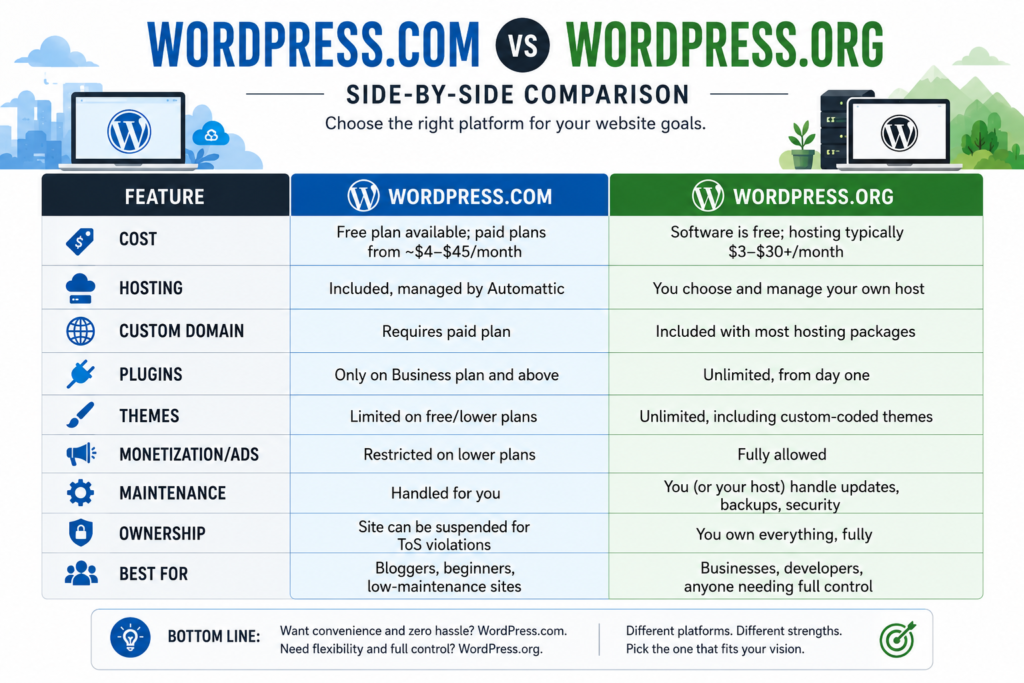
WordPress.com vs WordPress.org: Side-by-Side Comparison
WordPress.com: The Convenient, Managed Option
You might look at WordPress.com in the same way you would look at training wheels on a bike, or that of having a net. No server exposure. No need to keep track of security patches. And it even offers a free level to help you dip your toe in.
Where WordPress.com Shines
- Zero setup friction. Create an account and you’re publishing within minutes — no domain purchase or hosting configuration required.
- Built-in security and backups. Automattic handles server maintenance, so you’re less likely to get hacked through an outdated plugin.
- Predictable pricing. WordPress.com’s plans are tiered clearly, so there’s no surprise hosting renewal bill.
- Where It Falls Short
- Plugin and theme restrictions. Unless you’re on the Business plan ($25/month billed annually) or higher, you can’t install third-party plugins — which rules out most SEO tools, advanced forms, or e-commerce functionality.
- Branding on free plans. Your URL looks like yoursite.wordpress.com, and WordPress.com ads may appear on your pages unless you upgrade.
- Limited monetization. Running your own ads or affiliate links is restricted below the Premium/Business tiers, per WordPress.com’s advertising policy.
- I’ve watched creators start on the free plan, build an audience, and then get stuck rebuilding their entire site on a paid plan just to add an email signup plugin. If you think you’ll ever want more than basic blogging, it’s worth budgeting for at least the Premium tier upfront.
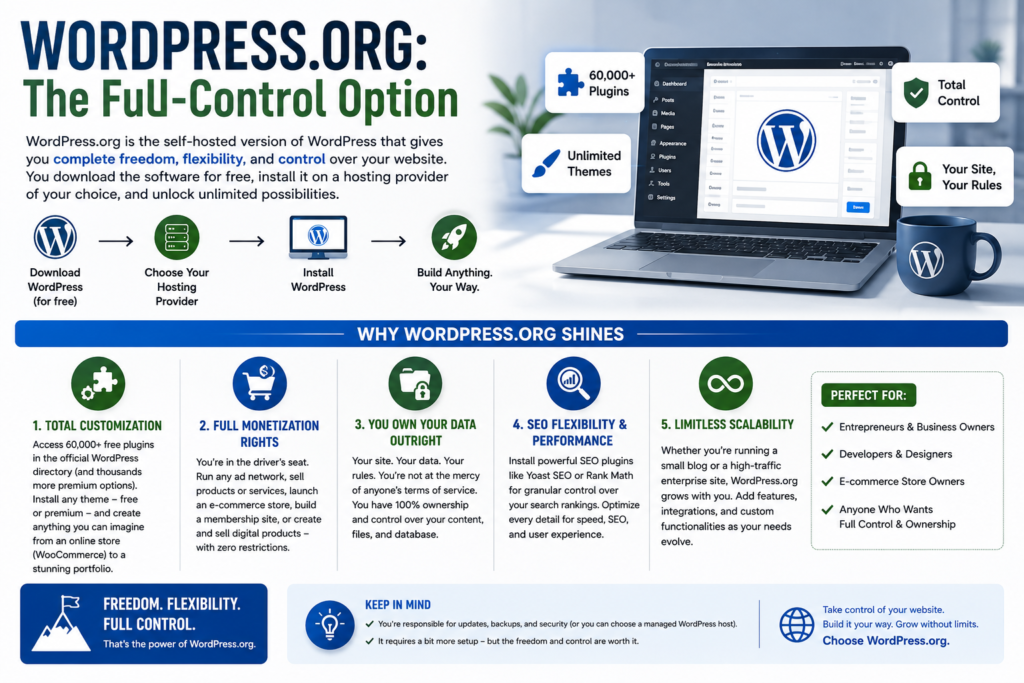
WordPress.org: The Full-Control Option
WordPress.org is the software that powers the “real” WordPress experience most developers and agencies mean when they say “I built it in WordPress.” You download it free from wordpress.org/download, install it on hosting you choose, and from there, nothing is off-limits.
Where WordPress.org Shines
- Total customization. Unleash a Universe of Options and Control WordPress.org 1. Total customizability. Use your own choice of thousands upon thousands of available plugins (more than 60,000 in the official WordPress directory alone!)
- in addition to any premium themes you’d like to install. This means you can transform your website into anything your imagination can dream up – from an online store (WooCommerce) to a creative portfolio.
- Full monetization rights. You’re in the driver’s seat. With complete control over your website, you can run any ad network you desire, set up an e-commerce site, build a membership business, and even develop and sell digital products without restriction.
- You own your data outright. You’re in the driver’s seat. With complete control over your website, you can run any ad network you desire, set up an e-commerce site, build a membership business, and even develop and sell digital products without restriction.
- SEO flexibility. Flexibility for SEO and performance. This includes installing powerful SEO plugins such as Yoast SEO and Rank Math for extremely granular control over your website’s searchability that simply isn’t possible with the less advanced levels of WordPress.com.
- WordPress.org: Downsides to Consider While WordPress.org offers unmatched freedom, it’s not for everyone:
Where It Falls Short
- You’re responsible for IT support. Upgrades, maintenance, security, backups – you have to handle it all yourself unless you pay for a managed hosting plan.
- Costs can add up. Depending on the themes, plugins, and the amount of traffic your website receives, costs can range significantly – though budget hosting plans start from around $3–10 per month.
- A steeper learning curve. Setting up your website (installing WordPress, finding and setting up hosting, downloading and configuring plugins) can feel more technical if you’re used to the all-in-one approach.
WordPress.com vs. WordPress.org: Which one is the Best Choice for YOU?
I’m going to skip the hedging and give you the direct answer:
Choose WordPress.com if:
- You are building a personal blog or an online portfolio that you do not intend to monetize in the near future.
- You don’t want to be burdened with the technical upkeep of a website. You are trying to test an idea and don’t want to invest any real money initially.
Choose WordPress.org if:
- You plan to use your website to build a business, sell products (either digital or physical), or generate revenue through other means.
- You desire the complete freedom to customize your website’s design and functionality according to your specifications.
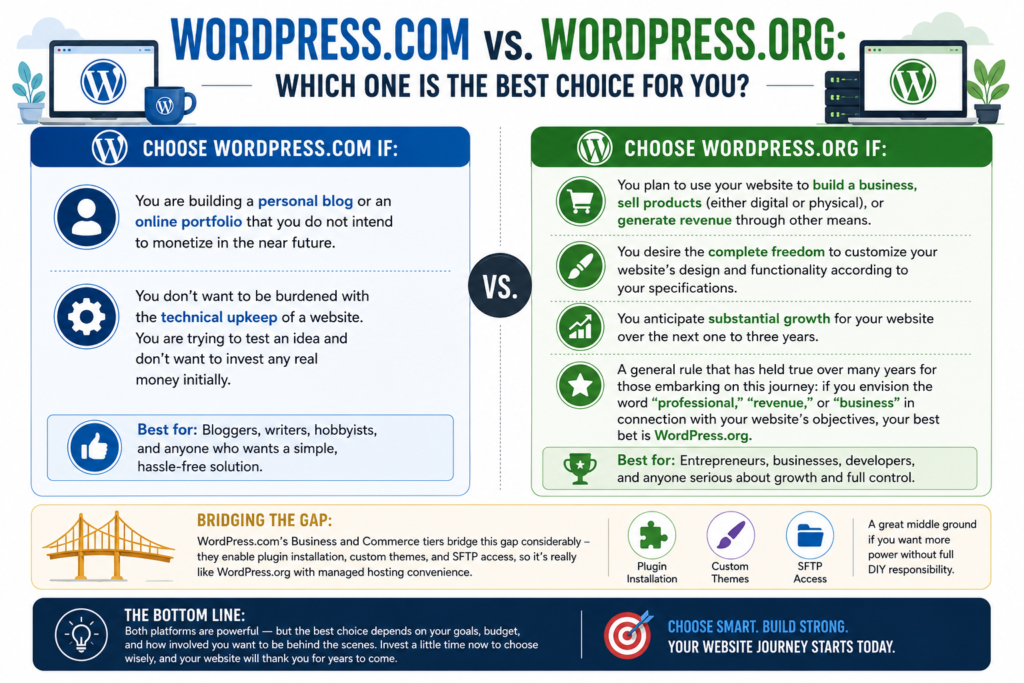
You anticipate substantial growth for your website over the next one to three years. A general rule that has held true over many years for those embarking on this journey: if you envision the word “professional,” “revenue,” or “business” in connection with your website’s objectives, your best bet is WordPress.org. That initial investment of time into learning curve pays off tenfold the first time you need a capability that’s simply not available on WordPress.com’s more constrained plans.
WordPress.com’s Business and Commerce tiers bridge this gap considerably – they enable plugin installation, custom themes, and SFTP access, so it’s really like WordPress.org with managed hosting convenience. If you’re scared off by the DIY hosting aspect of WordPress.org but still need plugins, this middle ground is worth considering before writing WordPress.com off.
Common Myths, Debunked
- “ WordPress.org is only for developers.” No – most hosts offer one-click WordPress install and many modern themes don’t require you to code anything.
- “WordPress.com is only for hobby blogs.” Nope again – their upper-tier plans can now support e-commerce and business sites – just at a higher price and a bit less freedom than if you self-hosted.
- “They’re basically the same thing.” As you can see above, while the underlying software is identical, everything else-from costs to who owns what-is very different.
The Bottom Line
Choosing between wordpress.com vs wordpress.org truly boils down to the ultimate trade-off: convenience or control. WordPress.com offers you a tidy, beginner-friendly package that’s managed for you. WordPress.org puts the reins in your hands to build (and manage) precisely what you’re aiming for.
There’s no universal right answer – just right for you, your needs, your wallet and your tolerance for being more hands-on. Honestly? If you have any doubt about future desires for more control, begin with WordPress.org on budget hosting. Moving off a WordPress.com account later on is significantly more difficult than starting simple and growing from there.
Are you leaning toward one or already on one? Let us know your story in the comments below, and if this information was helpful, please share it with someone else facing the same choice. To get more comparisons and deep-dives into website platforms and hosting, subscribe to receive new guides in your inbox.




2 Comments